TOPIC: Vina Bakery II

Vina Bakery II 10 years 7 months ago #1551

  • Martin de Graaf
  • Martin de Graaf's Avatar
  • OFFLINE
  • Junior Member
  • Posts: 32
  • Orders: 1
  • Download: 17
  • Karma: 0
Hello,

I am new on this forum and downloaded this very nice template. After a few times installing it is working properly. The only question I have is about the language. I can't change the language into my own language in the back-end. I uploaded my own language and set this language as default, but the language stays English. Is there a way to change that into my own (Dutch) language?
The administrator has disabled public write access.

Vina Bakery II 10 years 7 months ago #1558

  • Rango
  • Rango's Avatar
  • OFFLINE
  • Administrator
  • Posts: 848
  • Thank you received: 115
  • Karma: 22
@Martin de Graaf: I think you've missing some step to change the language in your website. Please try follow this: www.inmotionhosting.com/support/edu/joom...anging-site-language
No pain no gain! Accept the pain, future will be fruitful!
The administrator has disabled public write access.
The following user(s) said Thank You: Martin de Graaf

Hover effect is gone after changing the name of the article 10 years 6 months ago #1667

  • Martin de Graaf
  • Martin de Graaf's Avatar
  • OFFLINE
  • Junior Member
  • Posts: 32
  • Orders: 1
  • Download: 17
  • Karma: 0
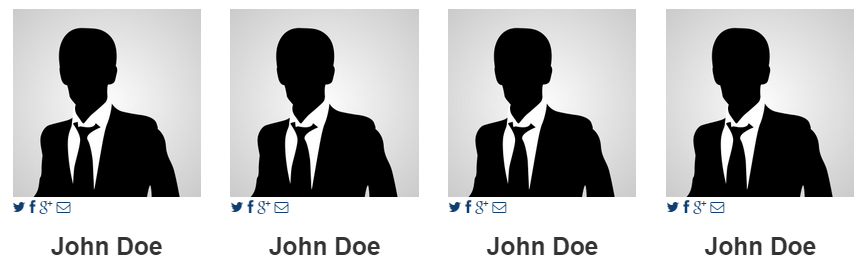
I have a few questions about the very nice hover effect for contact in the Vina_Bakery template. I was looking at the code to fill in the links to Facebook, Twitter, etc. First of all I changed the name of the article but after changing and saving the name, the hover effect was gone. I tried to find the code for the hover effect but could not find it.
So my first question is where I can make it work again and my second question is where I can put the code for linking to the social media.

This picture shows how the hover supposed to be working:
Hover1.png


This picture shows how the hover stopped working and the social contact icons are underneath the picture:
Hover2.png
Last Edit: 10 years 6 months ago by Martin de Graaf.
The administrator has disabled public write access.

Hover effect is gone after changing the name of the article 10 years 6 months ago #1684

  • Cuộc Sống Số
  • Cuộc Sống Số's Avatar
  • OFFLINE
  • Platinum Member
  • Life is not waiting!
  • Posts: 659
  • Orders: 0
  • Download: 129
  • Thank you received: 148
  • Karma: 33
@Martin de Graaf : You need 1 div sheathed your post:
<div id="vina_company">


company.png
Cuộc Sống Số - Quick CSS Game
Choose your level and start playing by clicking the topics below ...
♚ ♛ ♜ ♝ ♞ ♟ ♔ ♕ ♖
The administrator has disabled public write access.
The following user(s) said Thank You: Martin de Graaf

Vina Bakery II 10 years 6 months ago #1784

  • Martin de Graaf
  • Martin de Graaf's Avatar
  • OFFLINE
  • Junior Member
  • Posts: 32
  • Orders: 1
  • Download: 17
  • Karma: 0
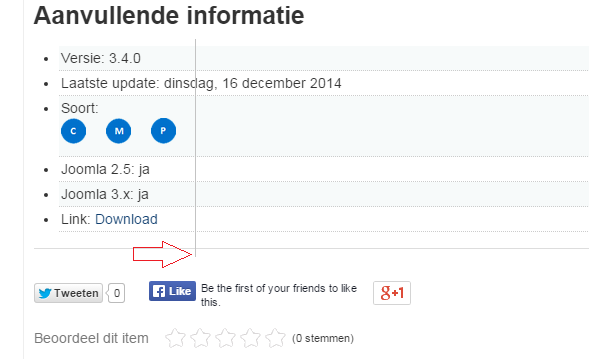
When I am using the extra fields in K2, they are NOT adjust. It seems that the code in the template override these functionality. Can you help me find the code where I must change that, so that the extra fields and nicely underneath adjust to each other. See the picture below:

Alignment.png
The administrator has disabled public write access.

Vina Bakery II 10 years 6 months ago #1788

  • Cuộc Sống Số
  • Cuộc Sống Số's Avatar
  • OFFLINE
  • Platinum Member
  • Life is not waiting!
  • Posts: 659
  • Orders: 0
  • Download: 129
  • Thank you received: 148
  • Karma: 33
@ Martin de Graaf,

You can edit code at file item.php : ROOT/templates/YOUR-TEMPLATE/html/com_k2/default/item.php :
 <?php if($this->item->params->get('itemExtraFields') && count($this->item->extra_fields)): ?>
	  <!-- Item extra fields -->
	  <div class="itemExtraFields">
	  	<h3><?php echo JText::_('K2_ADDITIONAL_INFO'); ?></h3>
	  	<ul>
			<?php foreach ($this->item->extra_fields as $key=>$extraField): ?>
			<?php if($extraField->value != ''): ?>
			<li class="<?php echo ($key%2) ? "odd" : "even"; ?> type<?php echo ucfirst($extraField->type); ?> group<?php echo $extraField->group; ?>">
				<?php if($extraField->type == 'header'): ?>
				<h4 class="itemExtraFieldsHeader"><?php echo $extraField->name; ?></h4>
				<?php else: ?>
				<span class="itemExtraFieldsLabel"><?php echo $extraField->name; ?>:</span>
				<span class="itemExtraFieldsValue"><?php echo $extraField->value; ?></span>
				<?php endif; ?>
			</li>
			<?php endif; ?>
			<?php endforeach; ?>
			</ul>
	    <div class="clr"></div>
	  </div>
	  <?php endif; ?>

And style them by override css : div.itemExtraFields, .itemExtraFieldsHeader, .itemExtraFieldsLabel , .itemExtraFieldsValue...
Cuộc Sống Số - Quick CSS Game
Choose your level and start playing by clicking the topics below ...
♚ ♛ ♜ ♝ ♞ ♟ ♔ ♕ ♖
The administrator has disabled public write access.
Leather Purses & Handbags, Women’s Crossbody Bags, Tote Bags for Women, Leather Backpacks, Men’s Wallets & Card Cases, Official OLEVS Website, OLEVS Couple Watches, OLEVS Women's Watches, OLEVS Men's Watches, OLEVS Watch, OLEVS Watches