TOPIC: Vina Bakery II

Vina Bakery II 10 years 10 months ago #1147

  • Alexander
  • Alexander's Avatar
  • OFFLINE
  • New Member
  • Posts: 4
  • Orders: 0
  • Download: 52
  • Karma: 0
Good day!
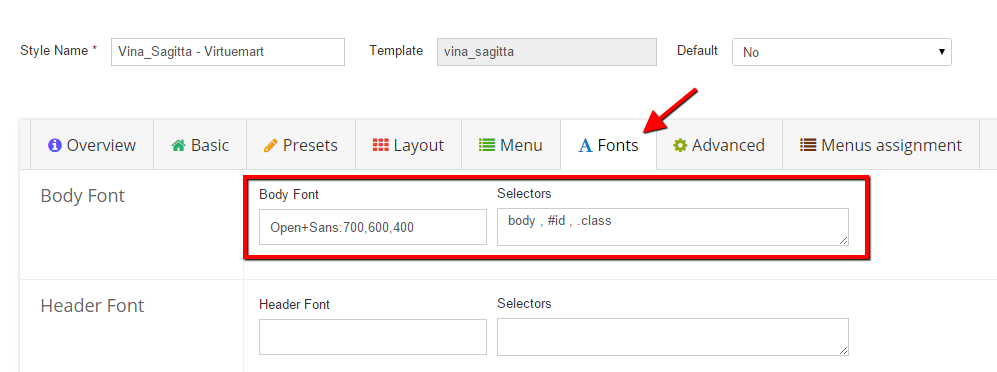
Please explain me how I can use template setting "Fonts" correctly.
Thank you
The administrator has disabled public write access.

Vina Bakery II 10 years 9 months ago #1154

  • swallow2603
  • swallow2603's Avatar
  • OFFLINE
  • New Member
  • Posts: 5
  • Orders: 0
  • Download: 213
  • Thank you received: 1
  • Karma: 0
Hello Alexander,

You want setting "Fonts" cant theme tab Fonts


Body Font You find in www.google.com/fonts#UsePlace:use/Collec...Nothing+You+Could+Do Selectors element of fonts.
You not want have fonts you for blank Selectors.
Sorry for my bad english :S
--ENTANH--
The administrator has disabled public write access.

Vina Bakery II 10 years 9 months ago #1196

  • Alexander
  • Alexander's Avatar
  • OFFLINE
  • New Member
  • Posts: 4
  • Orders: 0
  • Download: 52
  • Karma: 0
Hello!
Sorry, but I don't understand your explanation.
Can you show me an example of using tab "Fonts" in the template settings.

Thanks
The administrator has disabled public write access.

Vina Bakery II 10 years 9 months ago #1222

  • Michal Sabat
  • Michal Sabat's Avatar
  • OFFLINE
  • Senior Member
  • Posts: 46
  • Orders: 0
  • Download: 35
  • Karma: 0
Hello.

My page:http://www.ekopartner.org.pl/www/index.php?option=com_k2&view=item&id=5601:test&Itemid=553

First 2 tab works correctly ( when click on "smile" disapeare).

Others not working.

Please help me.
The administrator has disabled public write access.

Vina Bakery II 10 years 9 months ago #1223

  • Cuộc Sống Số
  • Cuộc Sống Số's Avatar
  • OFFLINE
  • Platinum Member
  • Life is not waiting!
  • Posts: 659
  • Orders: 0
  • Download: 129
  • Thank you received: 148
  • Karma: 33
Hello Alexander,

Sorry for the delay.

Template Settings – How to change templates font in Helix Template Framework
Do you want to change the font of your template? Definitely this is a very easy task. Just go through this documentation:
First go to Extensions > Template Manager
Select the desired template [we will change the font of this template].
You will find a menu like this. Click on Fonts.
This is the basic font setting scene.
Body Font:
Enter the body names at the Body Selectors Field.
Now insert the desire Fonts name and weight.
In the same way you will be able to change Header Font and Other font.


1_2015-03-02-2.png
Cuộc Sống Số - Quick CSS Game
Choose your level and start playing by clicking the topics below ...
♚ ♛ ♜ ♝ ♞ ♟ ♔ ♕ ♖
The administrator has disabled public write access.

Vina Bakery II 10 years 9 months ago #1224

  • Cuộc Sống Số
  • Cuộc Sống Số's Avatar
  • OFFLINE
  • Platinum Member
  • Life is not waiting!
  • Posts: 659
  • Orders: 0
  • Download: 129
  • Thank you received: 148
  • Karma: 33
Hello Michal Sabat,

I think the problem here is duplicate ID "#tab---"
Cuộc Sống Số - Quick CSS Game
Choose your level and start playing by clicking the topics below ...
♚ ♛ ♜ ♝ ♞ ♟ ♔ ♕ ♖
The administrator has disabled public write access.
Leather Purses & Handbags, Women’s Crossbody Bags, Tote Bags for Women, Leather Backpacks, Men’s Wallets & Card Cases, Official OLEVS Website, OLEVS Couple Watches, OLEVS Women's Watches, OLEVS Men's Watches, OLEVS Watch, OLEVS Watches